Linking incidents
Connect controls, risks, evidence, reports, and assets to an incident from the Links tab, using the dedicated framework-aware pickers.
Linking an incident to your other GRC objects records how it relates to your control environment and risk register — which control failed, which risk was realized, which evidence and reports document the response. All linking happens on the Links tab of the incident detail, and requires the incident:link permission.
The Links tab
The Links tab has two areas:
- Attached files — an uploader for files you attach directly to the incident.
- Related artifacts — a table of linked GRC objects (empty state: "No links yet"), with a Link… button and a Kind filter.
Attached files (uploaded to the incident) are distinct from linked evidence records (links to pre-existing GRC evidence in your library). Uploading a file is not the same as linking an evidence record.
The linkable kinds are Risks, Controls, Documents, Reports, and Assets, each stored in its own typed link.
Link a control
- On the Links tab, click Link….
- Choose Controls from the menu.
- The Link controls picker opens — a dedicated, fully filterable control picker with framework tabs (e.g. "All frameworks" plus each framework by name), a status filter, and a searchable grouped list showing each control's title, section reference, and implementation status.
- Select one or more controls (the action button updates to Link 1, Link 2, …). You can link several at once.
- Click Link. The dialog closes and each control appears in the Related artifacts table as a CONTROL row with its label and status.
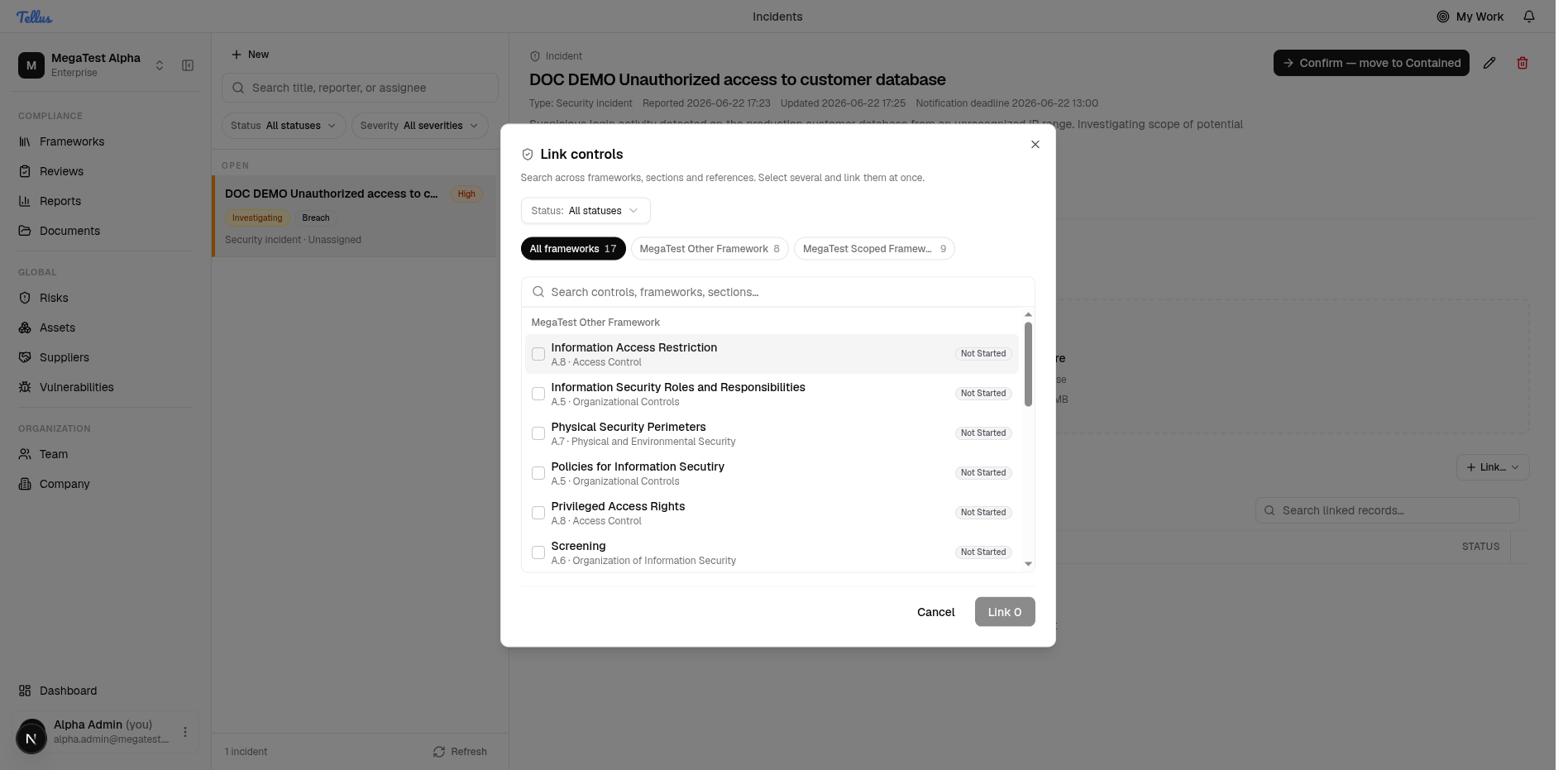
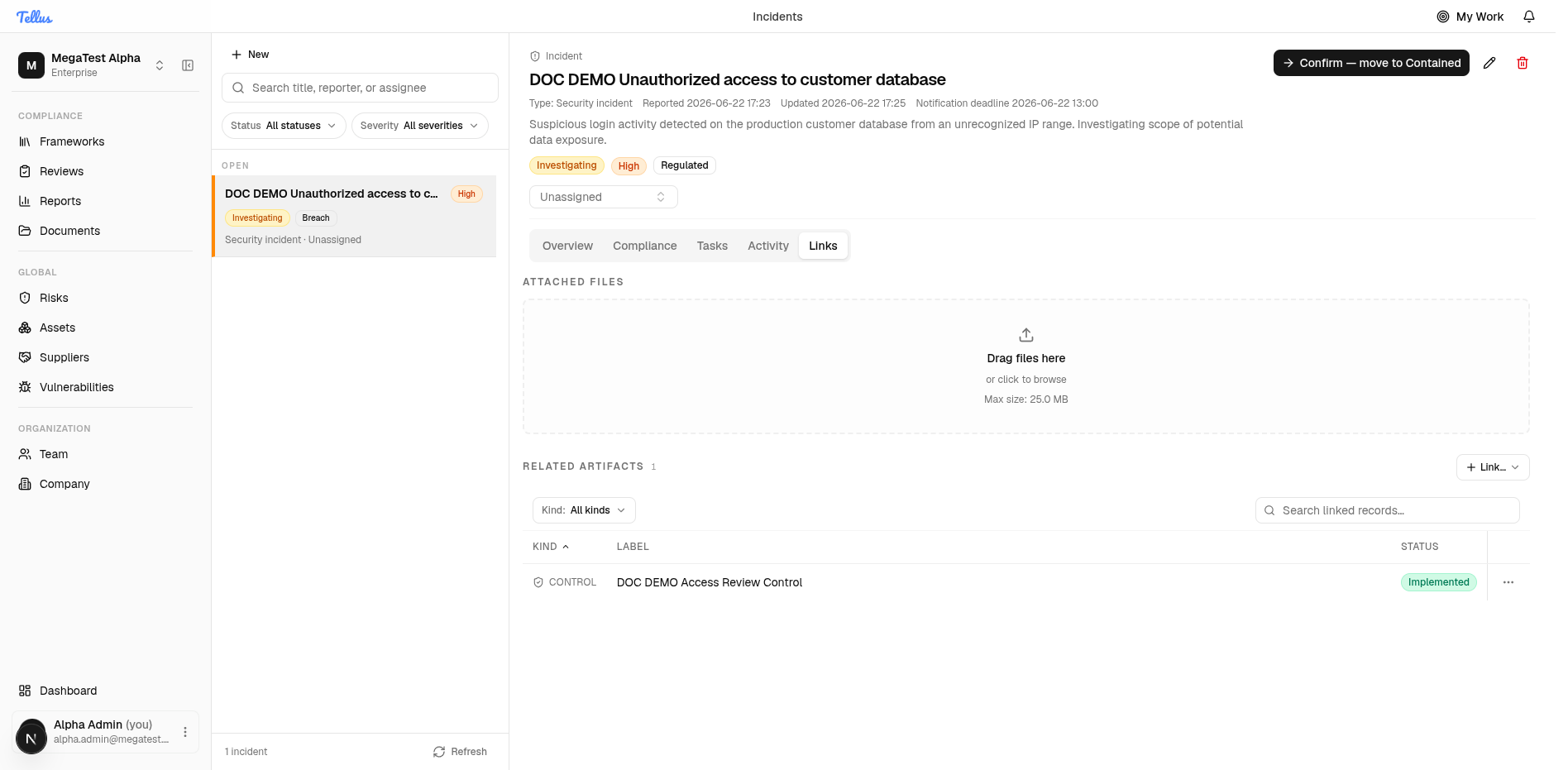
The control picker is framework-aware rather than a plain search box, so you can scope to a single framework's controls and filter by implementation status before selecting.
Link risks, documents, reports, and assets
The same Link… entry point handles the other kinds — pick the kind from the menu and select from its picker. Risks use a dedicated risk picker mirroring the risk register; the remaining kinds use their respective pickers. Each linked object appears in the Related artifacts table tagged with its kind, and can be filtered with the Kind filter or removed from its row.
Link subtypes
Control and risk links can carry a subtype describing how the object relates to the incident — for a control whether it failed, was bypassed, was missing, and so on; for a risk whether it was realized, contributed, or newly identified. These are free-text descriptors (length-limited), not enforced dropdowns — the vocabularies above are recommended conventions rather than a fixed list. Control links can additionally note an effectiveness delta and an associated remediation task; risk links can note impact on likelihood and impact.
Relationship to tasks
Remediation tasks are managed separately on the Tasks tab and, in this build, do not have their own in-dialog control/risk picker. Manage the incident-level associations here on the Links tab, and reference the relevant control by name in a task's detail field.
Regulatory notifications
How Tellus computes GDPR, NIS2, and DORA notification deadlines from awareness and detection times, and how to mark each regulator dispatch as sent.
Coordinated vulnerability disclosure
How vulnerability reports reach Tellus through the CVD portal, what the Vulnerabilities register shows, and where to work each report.