The asset register
Your company-scoped inventory of the things worth protecting — applications, services, systems, data sets — each with a type, criticality, and classification.
The asset register is your company's inventory of the things worth protecting: applications, services, systems, data sets, devices, and more. Each asset records a type, a status, a criticality, an optional owner and supplier, and three classification flags, and can be connected to the risks, controls, evidence, incidents, and vulnerabilities that relate to it.
Assets are company-scoped: every asset belongs to exactly one company, and the register only ever shows assets in the company you are signed into.
The split-view layout
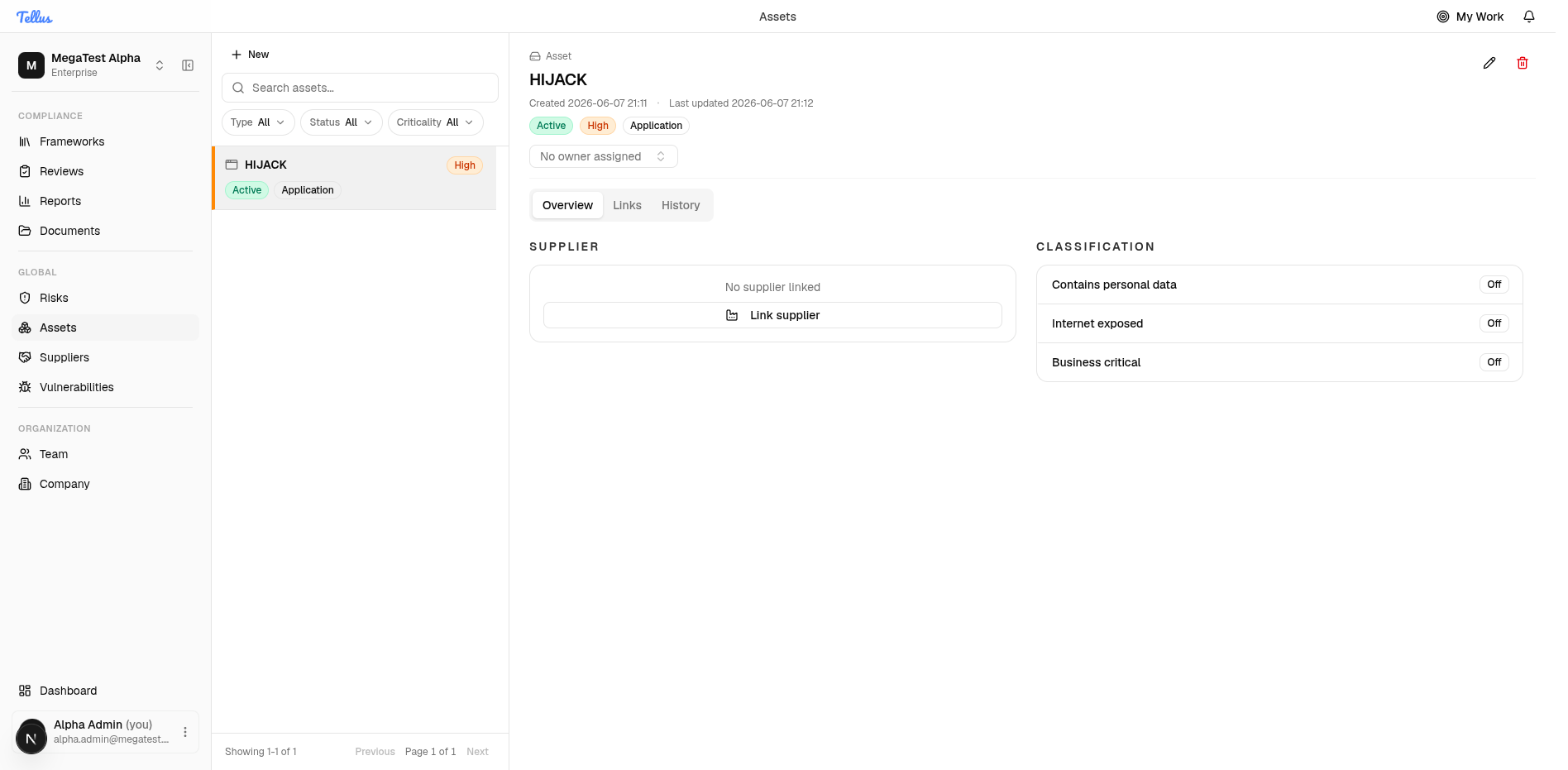
Open the register from the left sidebar under the Global group: click Assets. The page is a split view:
- Left — the register. A filterable list of your assets. Each row shows the asset name plus its criticality, status, and type. Above the list are a Search box and Type, Status, and Criticality dropdowns. The first asset is selected automatically, so you see details immediately. A footer (for example "Showing 1–1 of 1") reports how many assets are in view, with pagination when there are more.
- Right — the selected asset. Its header (name, created/updated timestamps, status chips) and three tabs: Overview, Links, and History.
Your last-used filters and the active detail tab are remembered per user across visits, so the register reopens the way you left it.
What you'll see as a member
The screenshots here are an admin's view. Assets appears in the sidebar for anyone with asset:read — company admins and members have it, so members see the same company-wide register and can open any asset, its Overview, and its Links. Editing is admin-only: the New button and every link, unlink, edit, and delete action are hidden unless you can edit assets, so a regular member gets a read-only view. Purely framework-scoped users don't have asset:read and won't see Assets in the sidebar at all.
Asset types
The Asset type categorizes what an asset is. Tellus ships with nine default types:
| Type | Stored value |
|---|---|
| Application | application |
| Service | service |
| System | system |
| Data set | dataset |
| Process | process |
| Integration | integration |
| Device | device |
| Infrastructure | infrastructure |
| Vendor service | vendor_service |
These nine are defaults, not a locked list — the asset-type catalog is extensible, so a company can add its own custom types. The capitalized words you see are display labels; the value actually stored is the lowercase code (for example vendor_service).
Status and criticality
Unlike type, Status and Criticality are fixed catalogs — companies cannot add custom values.
Status has five values: Draft, Active, Inactive, Retired, Archived (stored draft, active, inactive, retired, archived). New assets start as Draft.
Criticality has four ordered levels:
| Level | Stored value | Order |
|---|---|---|
| Low | low | 1 |
| Medium | medium | 2 |
| High | high | 3 |
| Critical | critical | 4 |
Criticality is a shared, ordered scale used across the product so that assets, risks, incidents, and prioritization stay aligned. The numeric order drives sorting and visual emphasis.
Type, status, and criticality are validated against your company's catalog on save. A value that looks valid can still be rejected if it isn't in your company's registry — for example a custom type that was never added.
Classification
Every asset carries three independent on/off classification flags, shown as toggles under the Overview tab:
- Contains personal data — the asset processes or stores personal data.
- Internet exposed — the asset is reachable from the internet or via public endpoints.
- Business critical — losing the asset materially impacts operations.
These are three separate booleans, not a single rating. They are a fast way to spot your most sensitive, exposed, or impactful assets without opening every record, and they prepare assets for future GDPR and incident workflows.
Asset classification here is not a confidentiality/integrity/availability (CIA) rating. The three flags above are the entire classification model.
Permissions
Asset actions are gated by four permissions:
| Permission | Allows |
|---|---|
asset:read | View the register, asset details, and all linked-record reads |
asset:create | Create assets |
asset:update | Edit assets, and link/unlink everything (risks, controls, evidence, supplier) |
asset:delete | Delete assets |
There is no separate "manage links" permission — all linking and unlinking, including the supplier association, requires asset:update.
In this section
Adding & classifying assets
Create an asset, set its type, criticality, owner, and classification flags.
Linking assets
Connect risks, controls, and evidence on the Links tab, and a supplier from the Overview.
Related
Uploading & mapping evidence
Upload a document to the Tellus library, understand duplicate detection and versioning, and attach it to controls, requirements, and assets.
Adding & classifying assets
Create an asset, choose its type and criticality, assign an owner, and set the three classification flags.