Roles & permissions
How Tellus access works: scoped role bindings, ownership relations, the seeded role catalog, derived grants, and who may assign what.
Access in Tellus is built from role bindings: a grant that ties a user to a named role at a specific scope. The same permission means "everywhere" or "just here" depending on the scope it was granted at. Understanding the scope model explains nearly every "why can this person see that?" question.
The four scope levels
Every role is tied to a scope_type, and a binding ties together (user, company, role, scope_type, scope_id):
| Scope | What a grant at this scope covers |
|---|---|
| company | The whole company — every framework, control, and risk. |
| framework | One framework only, and everything inside it. |
| control | A single control. |
| risk | A single risk. |
A company-scoped grant of report:read lets you read every report; a framework-scoped grant of the same permission lets you read reports only within that one framework. Nothing about the permission string changes — only the scope it was attached to.
Company roles
There are exactly two company-scoped roles:
| Role | Slug | What it grants |
|---|---|---|
| Company Admin | company_admin | Full company-wide administration. This is the role given to company owners. |
| Company Member | company_member | The base role every member holds. |
A plain Company Member now sees almost nothing company-wide. As of the 2026-06-21 change, every data-access permission was stripped from the company_member role (company:read, framework:read, control:read, risk:read, report:read, incident:view, and the rest). A Member's account carries company_member as a bare base role; all real data access is granted per framework via framework-scoped bindings. This is why the sidebar hides Team and Company for Members and redirects them off the dashboard to Frameworks.
"Company Auditor" and "Company Member" are the same role — company_auditor was renamed to company_member. Older material describing a Member as having read-only oversight across all company data is out of date.
Framework, control, and risk roles
Finer-grained access is granted with scoped roles. The seeded catalog:
| Scope | Role | Slug | Purpose |
|---|---|---|---|
| framework | Framework Admin | framework_admin | Full administration of one framework, including managing its roles. |
| framework | Framework Editor | framework_editor | Operational work: structure, controls, documents, remediation. |
| framework | Framework Approver | framework_approver | Approve within the framework. |
| framework | Framework Reviewer | framework_reviewer | Review within the framework. |
| framework | Framework Contributor | framework_contributor | Contribute within the framework. |
| framework | Framework Viewer | framework_viewer | Read-only access to one framework. |
| control | Control Editor | control_editor | Edit a single control. |
| control | Control Viewer | control_viewer | Read a single control. |
| risk | Risk Editor | risk_editor | Edit a single risk. |
| risk | Risk Viewer | risk_viewer | Read a single risk. |
Assigning a framework-scoped role
Framework roles are managed on each framework's own Roles page, not from the Team directory.
- Open the framework from Frameworks.
- In the framework's left sidebar, click Roles (route
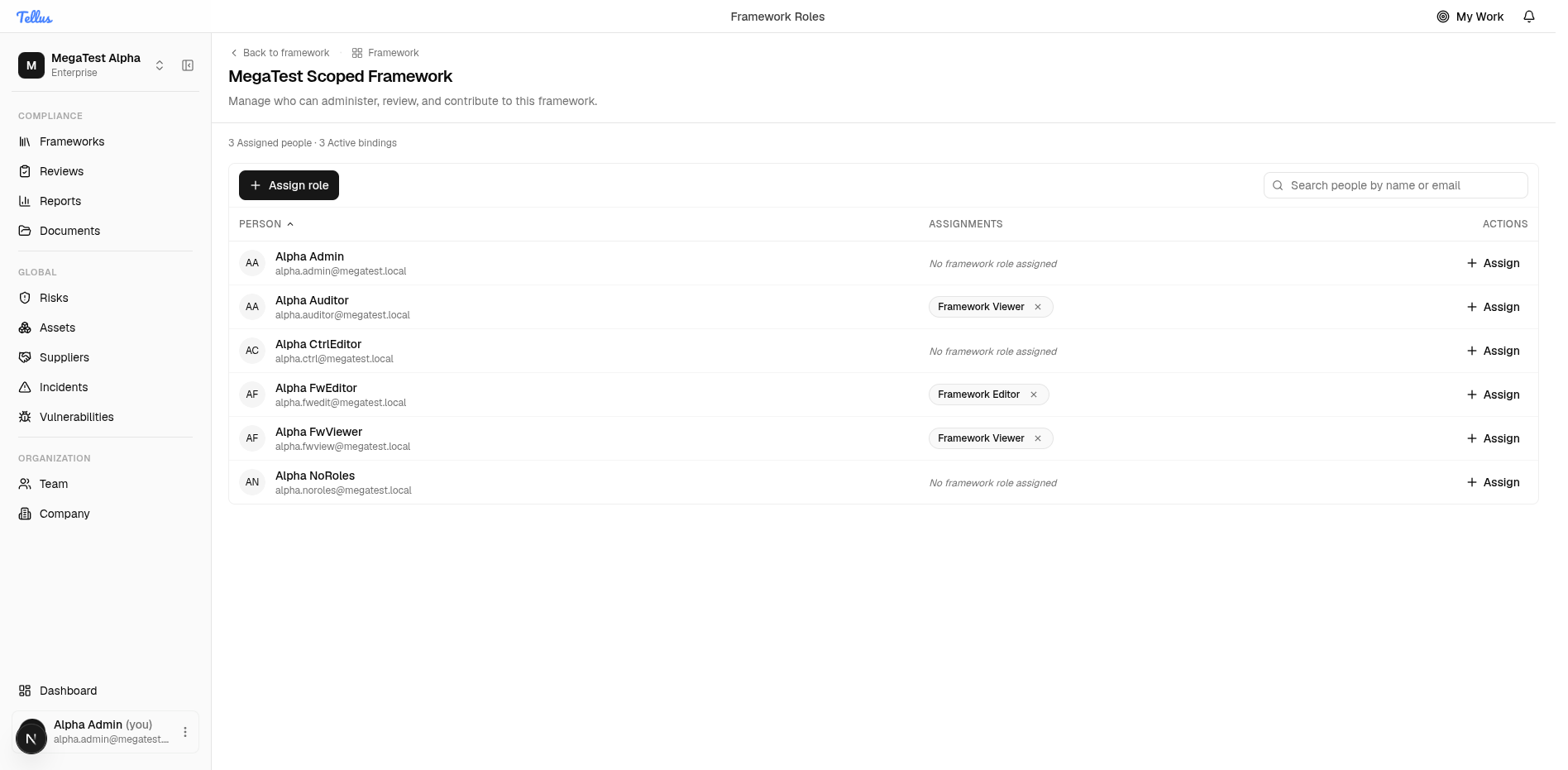
/framework/<id>/roles). - The Framework Roles page lists every company member with their current framework role (or "No framework role assigned") and a summary like "N Assigned people · N Active bindings".
- Click Assign on a member's row (or the Assign role button at the top).
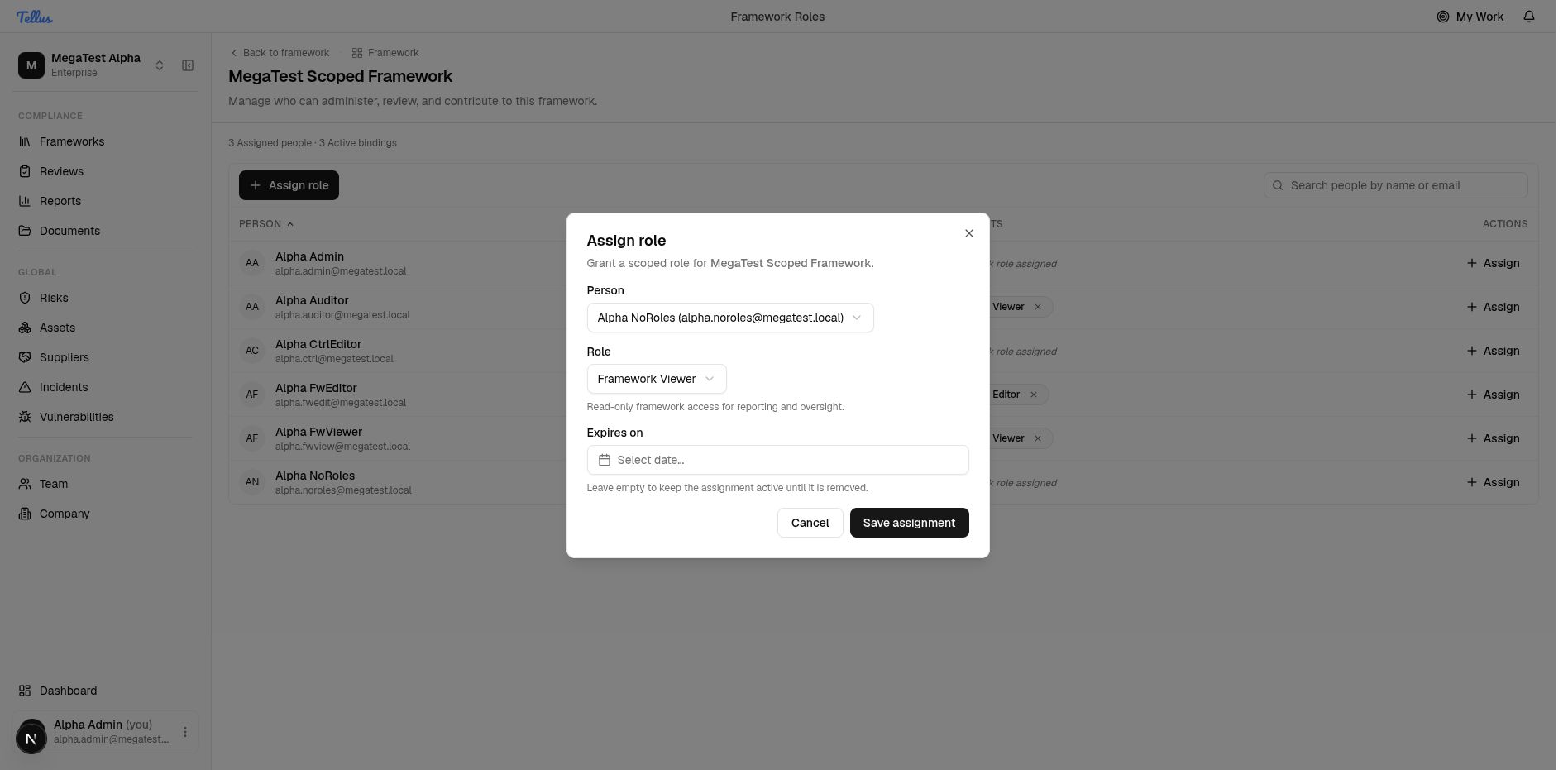
- In the Assign role dialog, confirm the Person, pick a Role from the six framework roles, and optionally set an Expires on date (leave empty to keep it until removed).
- Click Save assignment.
The page updates immediately: the binding count rises and the member's row shows the new role badge with a remove (×) control. Click the × to revoke a binding.
Ownership relations
Separate from role bindings, a user can hold a resource relation marking them as the owner of a resource:
| Relation | Slug | Grants |
|---|---|---|
| Company owner | company_owner | Ownership of the company. |
| Control owner | control_owner | Wildcard access (control:*) on the owned control. |
| Risk owner | risk_owner | Wildcard access on the owned risk. |
Relations are managed through the same role-assignment surfaces as bindings.
Derived framework viewer
Why does this person see the whole framework?
Granting someone a control-scoped role — or making them a control owner — automatically creates a derived framework_viewer binding on that control's framework, so they can see the surrounding context (the framework, its controls, and its reports). This derived binding is system-managed (Source = 'control_owner'). It is auto-reclaimed only when the user no longer holds any control-scoped grant in that framework. A manual admin grant of the same role has Source = null and is never auto-revoked — and re-granting an existing derived viewer manually promotes it to a permanent binding.
Who can assign what
To assign, change, or remove a binding at a scope, the actor must hold permissions:update at a scope that covers the target scope:
- A Company Admin (company-scoped grant) can manage roles at every scope.
- A Framework Admin can grant framework, control, and risk roles only within their framework.
- A control owner can manage only control-scoped roles on their own control.
Viewing a person's assignments is filtered the same way by permissions:read per scope — a framework admin sees only the target's grants inside their own framework, never company-wide or other-framework grants.
The escalation guard is the scope model itself, not a "compare privilege levels" check. A request to bind a role resolves to the resource context for that scope; a company-scoped binding resolves to a company-only context that only a company-scoped grant can satisfy. So a framework admin or control owner cannot reach company-level roles, or a framework/control they do not administer — their grant simply does not satisfy the resolved context. The same guard applies to assign, update, and remove.
What appears in the sidebar
Most navigation is permission-gated on the client, but Risks, Incidents, and Reports are special: they can be reached at finer-than-company scope (a framework grant, a risk_owner relation, or an incident reporter/assignee relation), which the company-level permission set the sidebar holds cannot see. Those three entries are gated on the server-computed endpoint GET /dashboard/nav-visibility, which returns {risks, incidents, reports} booleans.
- A company-level grant (
risk:read/incident:view/report:readat company scope) always shows the entry — even with zero rows. - A framework-only user sees the entry only if at least one row is actually visible to them.
- Documents and Frameworks have no flag — any member may reach them.
Nav-visibility fails open: if the call errors, the sidebar shows Risks, Incidents, and Reports anyway, and every page still enforces access server-side. A transient failure never hides nav from someone who actually has access.
Related
- Inviting members — invites can attach framework-scoped roles at invite time.
- Company settings & security — the Access tab manages company-wide role assignments.