The document library
Tellus's company-wide library of uploaded files — what the library holds, why documents and evidence are the same thing, and who can read them.
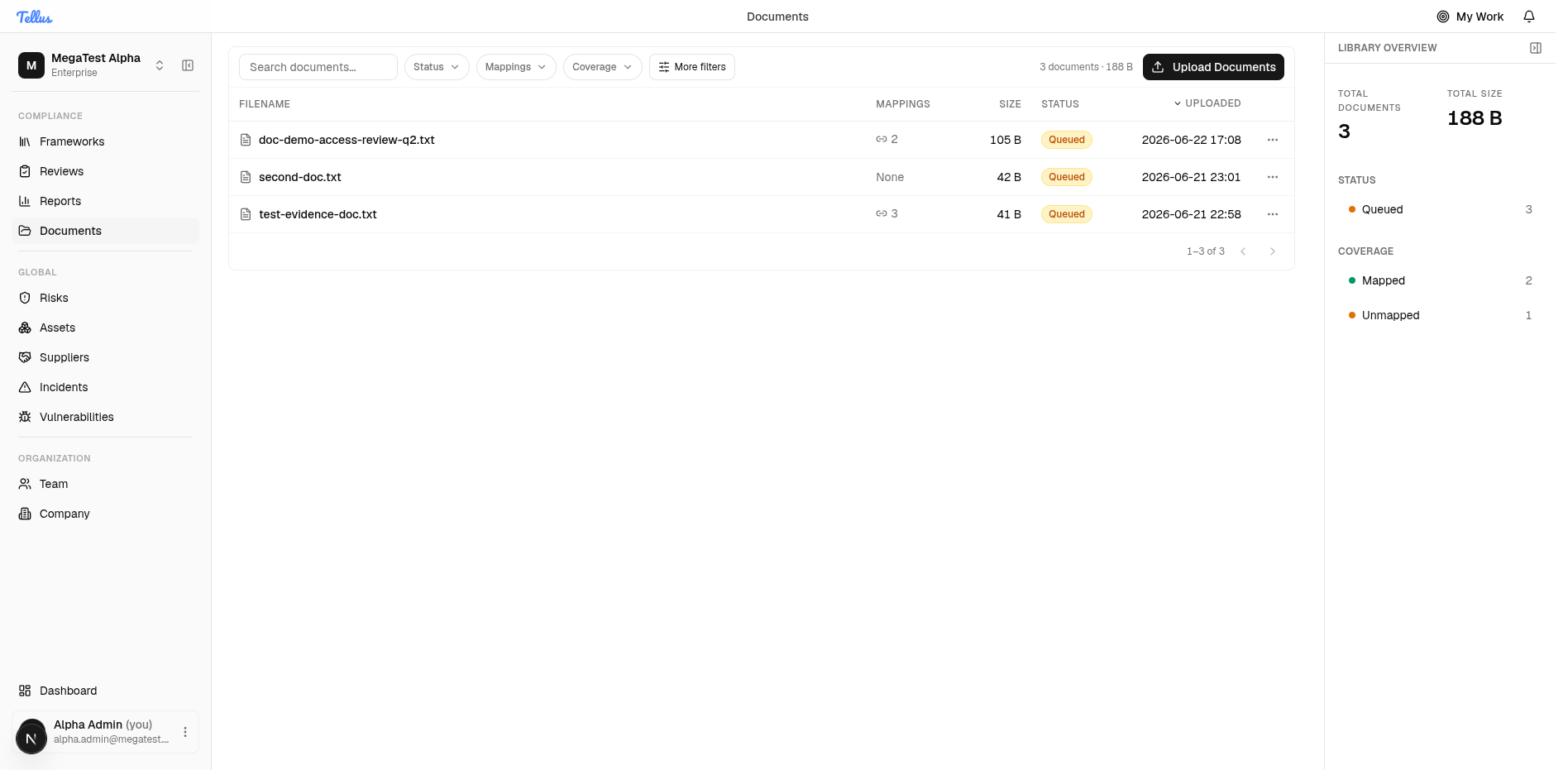
The Documents library is your company's central register of every uploaded file: policies, procedures, screenshots, exports, signed attestations, and anything else you use to prove your controls are working. Open it from Documents in the left sidebar. The page is a paginated table — Filename, Mappings, Size, Status, Uploaded — alongside a live Library overview panel showing totals, a status breakdown, and coverage.
Documents and evidence are the same thing
Throughout the app the words "document" and "evidence" describe the same uploaded file. "Documents" is the name on the navigation item and the library page; "evidence" is the term used on a control's page and in the API. There is no separate evidence store to learn — the Documents library is the evidence register. When a control asks for evidence, you attach a document from this library; when you link a document to a control, it becomes that control's evidence.
A file can live in the library without being attached to anything. The library shows everything your company has uploaded; attaching it to a control is a separate step (see Uploading & mapping evidence).
Who can read documents
Any signed-in member of your company can read, open, download, and preview every document the company has uploaded. Reading is intentionally ungated — there is no per-document or per-folder permission to manage, and no special role is required to see the library. Access is scoped to your company, so you only ever see your own company's files and never another tenant's.
Editing is a different matter. The actions that change documents — uploading, uploading a new version, deleting, and linking or mapping to controls, assets, or requirements — each require a permission. If a member can see a document but not the Upload Documents button or an Unlink action, they hold read access but not the matching write permission.
Reading vs. changing
See it, open it, download it: every member. Upload, version, delete, link, map: requires the relevant permission. This split is deliberate — broad visibility into compliance evidence, controlled changes.
The Library overview
The panel on the right of the library summarises the whole register:
- Total Documents and Total size — counts and storage across the company.
- Status — how many documents are in each processing state (see below).
- Coverage — Mapped versus Unmapped: how many documents are linked to at least one control or asset, and how many are linked to nothing yet.
The overview reflects the entire library and deliberately ignores the table's drill filters (Status, Coverage) and paging, so its numbers stay stable while you filter the table beneath it. Coverage is the fastest way to find orphaned uploads — filter the table to Unmapped to see everything that still needs to be attached as evidence.
Processing status
Every upload is parsed and summarised by Tellus in the background, so a document moves through a short lifecycle. The Status column and overview use these values:
| Status | Meaning |
|---|---|
Queued | Just uploaded; waiting to be processed. The description reads "Processing summary…" until processing finishes. |
Parsing | Tellus is reading the file and generating an AI summary. |
Ready | Processing finished; the AI summary and description are populated. |
Failed | The file could not be parsed or summarised. The document is still stored, downloadable, and linkable. |
Processing is asynchronous, so a freshly uploaded file shows Queued immediately and its summary appears only once it reaches Ready. A Failed status does not lose your file — it only means the automatic summary is unavailable.
In this section
Related
- Frameworks & controls — where a control lists its evidence requirements and where mapped documents are reviewed and accepted.
- Assets — documents can also be linked to assets.