Linking & remediation
Connect a vulnerability to the risks, controls, and assets it touches so it shows up in your wider GRC picture.
A vulnerability rarely stands alone: it threatens specific assets, it maps to risks in your register, and it is mitigated by controls in your frameworks. The Links tab on a report records those relationships, putting the vulnerability into your wider governance, risk, and compliance graph. For the report lifecycle itself, see Triaging a report.
A vulnerability can be linked to three kinds of record:
| Kind | What it connects to | Why |
|---|---|---|
| Risk | An entry in your risk register | Tie the weakness to the risk it realizes or raises. |
| Control | A control in any of your frameworks | Record which safeguard mitigates (or failed to prevent) it. |
| Asset | An asset in your inventory | Identify what the vulnerability affects. |
There is no link to incidents. Vulnerabilities connect only to risks, controls, and assets. If a disclosed vulnerability becomes a live security event you handle it as a separate incident record — the two are not joined in the data.
Open the Links tab
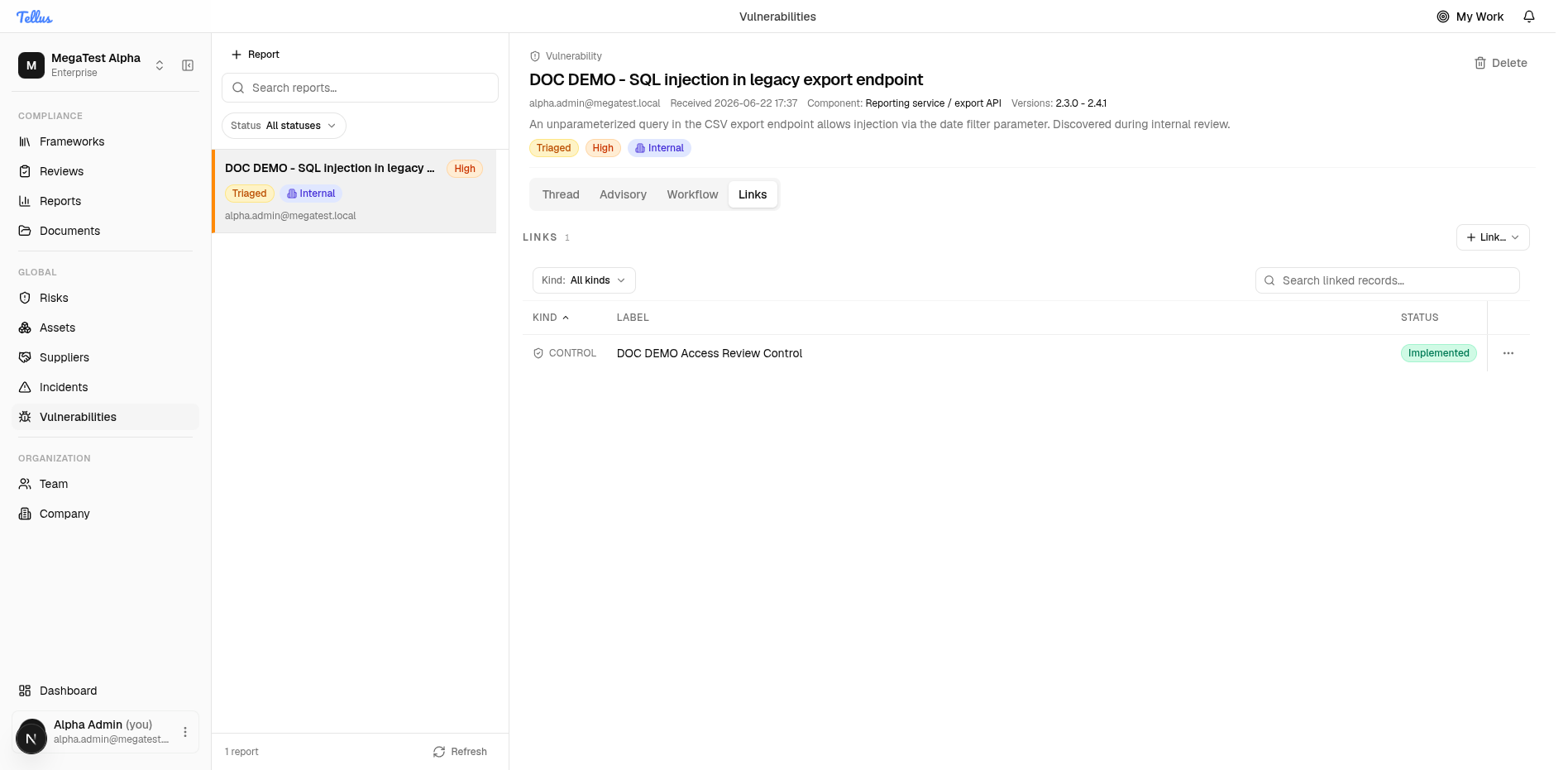
With a report open, click the Links tab. It shows a link count, a Link… button, a Kind filter, a search box, and a table of existing links. A fresh report reads No links yet.
Link a control
- Click Link…. A small menu offers the kinds you can link: Risks, Controls, Assets.
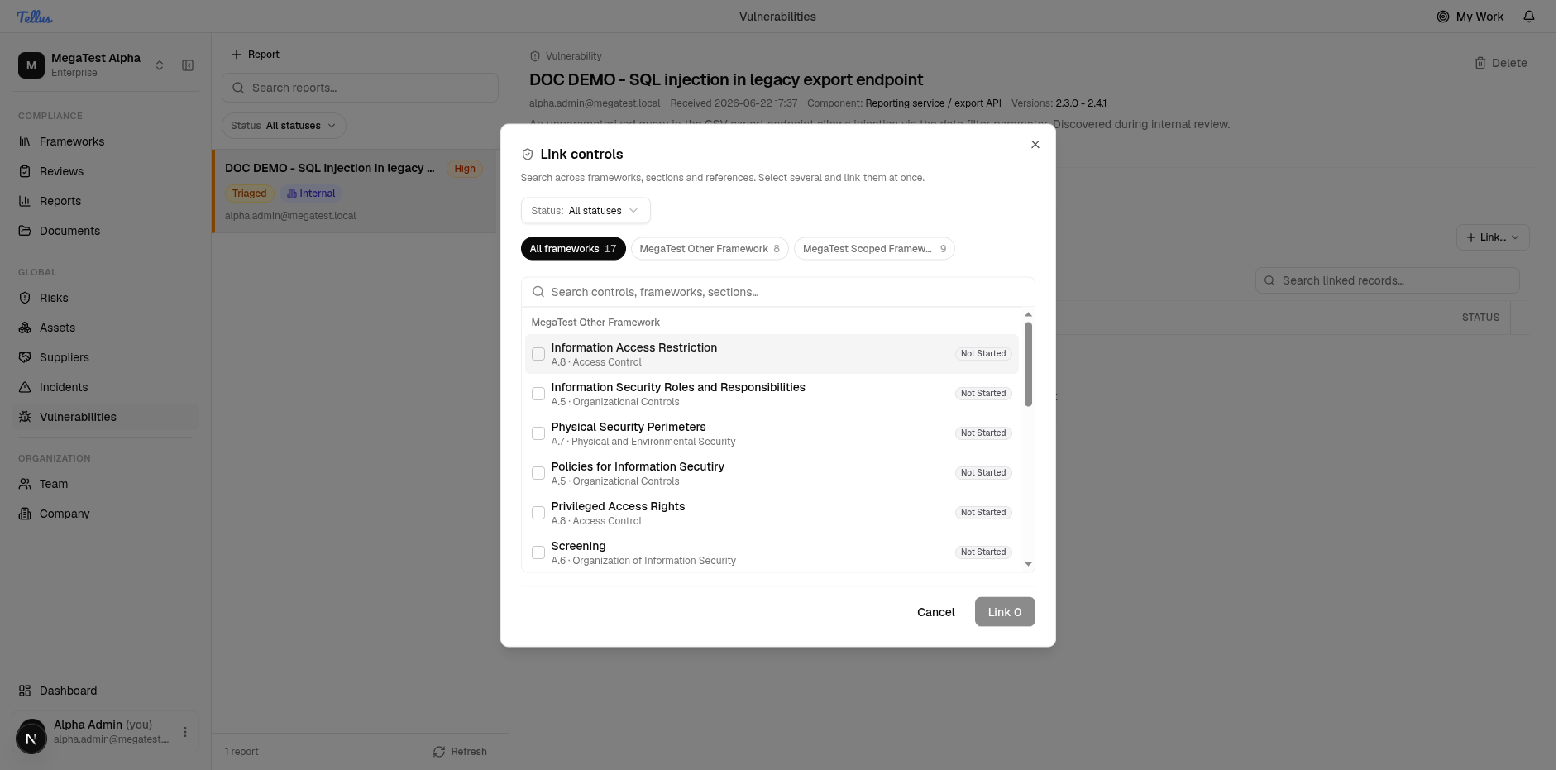
- Choose Controls to open the Link controls picker.
- The picker is the same scale-aware control picker used across risks and evidence. It has a search box, a Status filter, and framework tabs (for example All frameworks, then a tab per framework with its control count). The suggestions list is grouped by framework, and each option shows the control name, its section reference (e.g. A.5 · Organizational Controls), and its implementation status.
- Select one or more controls — selection works across framework tabs in a single pass. Each pick moves into a "selected" chip area and the action button updates to Link <n>.
- Click Link <n>.
The dialog closes and the new links appear in the table. Each row shows the Kind, the linked record's Label, and its live status (for a control, its implementation status — e.g. Implemented), plus an inline Unlink action.
Link a risk or an asset
Risks and assets work the same way through the Link… menu:
- Risks open a risk picker mirroring your risk register; linked rows display each risk's current status.
- Assets open an asset picker; linked rows display each asset's type, criticality, and status.
Linking any of the three requires the link permission. The picker only shows records you're allowed to see.
Unlinking
Use the Unlink action on a link row to remove a single connection. Unlinking only severs the relationship — it never deletes the risk, control, or asset itself, and it does not affect the vulnerability's status or workflow.
Linked rows reflect the current status of the target record, not a snapshot from when you linked it. If a control later moves from Implemented to a different state, the row on the vulnerability updates to match — so the Links tab is a live view of how the vulnerability sits against your controls, risks, and assets.