My Work
Your personal accountability workspace — every open obligation you own, ranked by real-world consequence, with an explanation of why each item sits where it does.
My Work is your personal accountability workspace. It gathers every open obligation that is assigned to you or owned by you — across controls, risks, treatment actions, incident tasks, regulatory deadlines, supplier findings, supplier reviews, and expiring contracts — and ranks them by how much is at stake if you do nothing. Each row also tells you why it ranks where it does.
It is distinct from the notification bell. Notifications are transient records of things that happened; My Work is the durable list of things still open and owed by you. An item leaves My Work only when the underlying obligation is closed — not when you read it.
You reach it two ways: the full page at /my-work, and the peek popover that drops down from the My Work button in the top bar for a fast triage glance without leaving the page you're on.
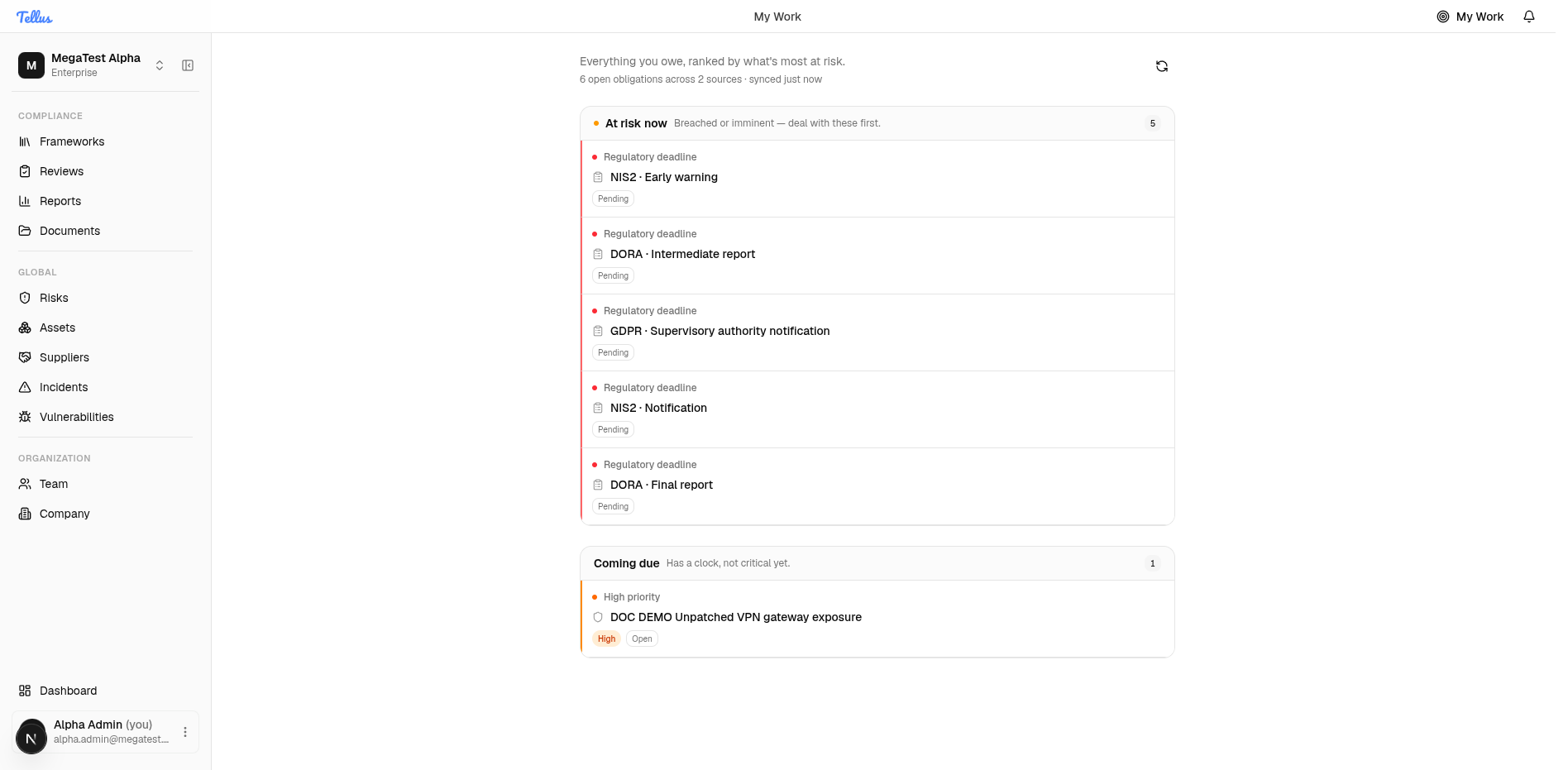
The three zones
Every obligation is sorted into exactly one of three display zones, shown on the page in this fixed order:
| Zone | What lands here | On the page |
|---|---|---|
| At risk now | Regulatory deadlines, overdue items, and anything due today | Lead zone, emphasized with a warning marker — "if you do nothing else, do this" |
| Coming due | Due this week, high/critical priority without an imminent clock, or scheduled further out | The working queue |
| Unscheduled | Owned work with no clock and normal priority | Collapsed by default so clocked work isn't drowned |
The number on the My Work badge in the top bar counts only At risk now items — not your total backlog. Empty zones are hidden entirely.
A high- or critical-priority item with no imminent due date sits in Coming due, not At risk now. "At risk now" is reserved for things with a clock that has run out or is running out today (plus regulatory deadlines).
How ranking works
Within and across zones, items are ordered server-side by three keys, in this order:
- Consequence tier — the dominant key. Regulatory deadlines first, then overdue, then due today, and so on down to unscheduled backlog.
- Due date, soonest first — items with no due date are pushed to the very end.
- Priority/severity — critical before high before medium before low. This only breaks ties between items in the same tier with the same due date.
Tier always wins. The full tier-to-zone mapping, the exact day-boundary rules, and the list of which obligation types feed the workspace are covered below; the day-by-day mechanics are detailed throughout this page and on The peek popover.
Working items in place
Four obligation types can be completed without leaving My Work, each via its own inline action:
| Type | Inline action |
|---|---|
| Incident task | Mark complete |
| Supplier finding | Resolve (or, if it's a follow-up assigned to you, acknowledge) |
| Supplier review | Close |
| Risk treatment action | Complete |
Controls, risks, and expiring contracts have no single unambiguous "done" verb, so they are navigate-only — the row links you to the module page to act there. Filing a regulatory notification is gated behind a confirmation dialog and can be blocked if required fields are missing.
Where the items come from
My Work unions seven personal sources, plus regulatory deadlines:
- Controls assigned to you — no due date, so they always fall to the backlog.
- Risks you own — due date taken from the earliest non-completed treatment action deadline.
- Treatment actions assigned to you — due = the action deadline (completed ones are skipped).
- Incident tasks assigned to you — due = the task's due date.
- Supplier findings you own, plus follow-ups assigned to you — due = the follow-up's due date, else the finding's due date.
- Supplier reviews assigned to you — due = the review's due date.
- Expiring supplier contracts for you — due = the contract end date.
- Regulatory deadlines — statutory incident-notification clocks; always top-ranked (see below).
Controls never carry a due date, so they can never reach a date-based tier — they always land in the backlog (high/critical priority → Coming due, otherwise Unscheduled). A risk only gets a clock if it has a non-completed treatment action with a deadline. Recurring control/risk review due dates do not currently drive My Work ranking; those live in Reviews.
Regulatory deadlines
Open incident regulatory-compliance deadlines — for example a NIS2 early-warning window or a GDPR supervisory-authority notification — are the special top tier. They are always ranked first regardless of how much time is left (never describe one as "overdue" — being a statutory clock outranks the date). Their title is built from framework plus stage, e.g. NIS2 · Early warning.
These appear only after an incident has regulatory context populated; until then the surface has none, and that absence is by design, not a bug.
A regulatory deadline is shown to the incident's reporter or assignee. The system itself flags this as a proxy for accountability: regulatory notification is often a compliance officer's duty, but there is no deadline-owner field to scope by — so the right person may not see the clock and the wrong person might. Don't assume My Work guarantees the accountable owner sees every regulatory deadline.
Access and trust
The workspace requires only that you are signed in — there is no separate permission. It is personal by construction: every underlying query is already filtered to your own ownership and assignments.
Under the heading you'll see a status line such as "6 open obligations across 2 sources · synced just now", drawn from the reply's completeness data (total items, per-source counts, at-risk count, and the build timestamp). This lets the surface claim to be the authoritative list.
If the list fails to load, My Work shows an explicit error and retry — never the "you're clear" empty state. In a deadline tool a silent failure that looks like "nothing to do" could cause a missed obligation, so the error is always loud. If stale data is on screen, it stays visible with a "refresh failed" note rather than vanishing.
Refreshing
The full page loads on mount and has a manual Refresh button. The peek refreshes every time you open it. After a successful inline action the row is removed immediately and the counts (total and at-risk) are recomputed locally — if the server rejects the action, the row reverts and a toast explains why.